The Dimension button allows drawing a dimension.
Quick Access Panel: 
Ribbon: Editor -> Text -> Dimension
Menu: Draw -> Dimension
To add a dimension
1.Click on the button .
2.Click once to specify the first point of the entity (Snap mode is available) or enter the coordinates in the the dynamic input window.
3.Specify the second point.
4.Move the mouse to create the extension lines and the dimension line itself. At this point you can specify the length of the extension lines by entering the necessary value from the keyboard in the dynamic input window.
5.Click to fix the position of the extension and dimension lines in the drawing.
A dimension has a set of properties which can be viewed and edited in the Properties panel:
Property |
Description |
|
|---|---|---|
Color |
Defines the color of the dimension. |
|
Layer |
Defines the layer which the dimension belongs to. The property contains a list of all available in the drawing layers and allows to move the dimension to another layer. |
|
Style |
Defines the dimension style of the dimension. Dimension styles allow to apply a constant set of needed properties to a dimension. |
|
Measurements scale |
Defines the scale parameter for linear dimensions. It is not recommended to change value by default - 1.000. For instance: if this parameter is 2, then dimension 1mm will be viewed as 2mm. |
|
Precision |
Defines the number of characters after the comma. |
|
Text Color |
Defines the dimension text color. |
|
Text Height |
Defines the dimension text height. |
|
Text Rotation |
Defines the dimension's rotation angle. |
|
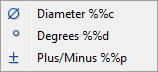
Text Override |
Allows redefining the dimension text and adding special characters (press
|
|
Text pos vert |
Defines the placement of the dimension text against the dimension line.
|
|
Text Inside Align |
Defines the text alignment along the dimension lines |
|
Text Offset |
Defines the dimension text offset. |
|
Arrow size |
Defines the size of the dimension arrows. |
|
Arrow 1, 2 |
Defines the view of dimension arrows 1 and 2. |
|
Dimension Line Color |
Defines the color of the dimension lines. |
|
Extension Line Color |
Defines the color of the extension lines. |
|
Extension Line 1, 2 |
Switches extension lines 1 and 2 on or off. |
|
Extension Line Extension |
Defines the length of extension lines. |
|
Extension Line Offset |
Defines the space between the extension lines and the measured object. |
|
Dimension Line 1, 2 |
Switches dimension lines 1, 2 on or off. |
|
Control Point |
Contains control point coordinates. |
|
Base Point 1, 2 |
Contains base points 1 and 2 coordinates. |


Go to ABViewer