The Trim button allows to delete the specified segment outside or inside the outline of the selected objects.
Quick Access Panel: 
Ribbon: Editor -> Instruments -> Trim
Menu: Tools -> Modify -> Trim
Object trim
To perform trimming select the outline press the key Enter to confirm the selection and specify the segments that must be deleted.
For example, you want to delete the circle and line segments that are inside the red rectangle:
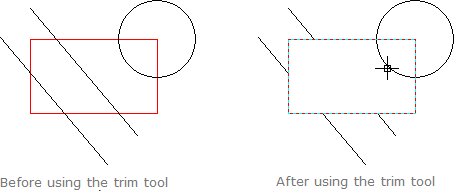
1. Select the command Trim.
2. Select the cutting element. In the given example the red rectangle is selected as a cutting element. Several cutting objects can be specified.
3. Press the key Enter to confirm the selection.
4. Use the green selection rectangle (draw the selection rectangle in the bottom-up direction) to select the objects inside or outside the cutting object that should be deleted.
5. Press the key Esc to finish and leave the trim mode.
Note: a segment that doesn't intersect the selected outline can't be deleted.
Point trim
Deletion of segments takes place on the internal or external side of the selected outlines after a single click with the left mouse button on the corresponding outline side. For example a red rectangle is used as the outline.
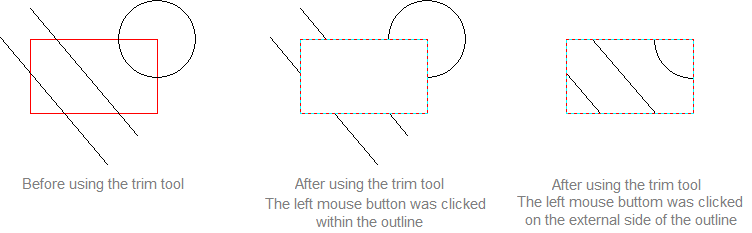
1.Click with the left mouse button the black rectangle situated to the right from the command Trim and choose Point trim mode from the list;
2.With the help of the left mouse button choose the red rectangle on the drawing which will be used as the outline for objects trimming;
3.Press Enter key to finish selection of the outline objects;
4.To delete segments within the rectangle click with the left mouse button within its boundaries. As a result object segments intersecting the trimming outline will be deleted at the internal side of the rectangle.To delete segments on the external side click with the left mouse button in any place outside the rectangle boundaries. As a result object segments intersecting the trimming outline will be deleted on the external side of the rectangle.
5.Press Esc key to quit segments trimming mode.
Go to ABViewer